.png)
Local Service Ads Is Transitioning To Google Ads

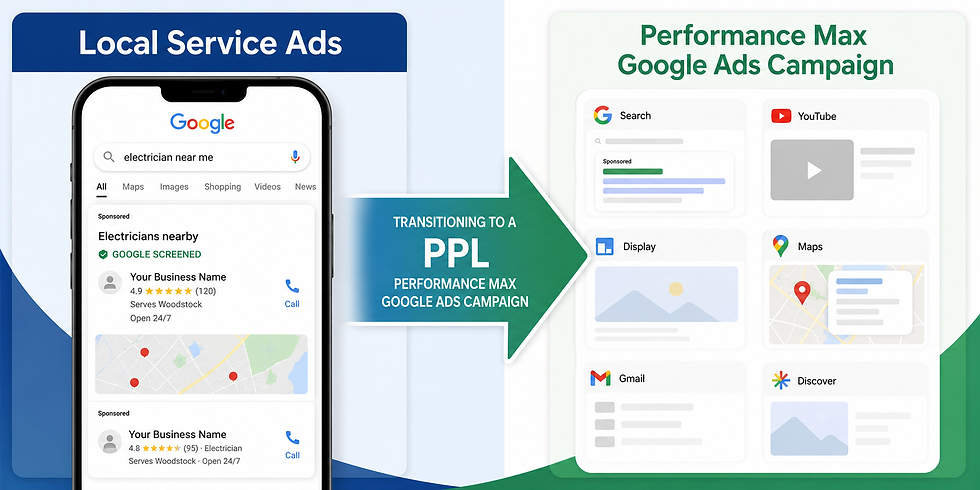
LSA's As We Know It - Is Moving to Google Ads — What Every Business Should Know
Google is bringing Local Services Ads into the Google Ads platform. Here's what is changing, what stays the same, and how your business can prepare.
If your business runs Local Services Ads (LSA), you've likely seen the announcements: Google is consolidating LSA management directly into the Google Ads platform. This is a significant operational change, but the good news is that the fundamentals of how LSA works — and why it's valuable — aren't going away.
Here's everything you need to know, in plain language.
The Short Version
You'll manage your LSA campaigns inside Google Ads instead of the separate LSA dashboard. You'll still pay per qualified lead, your ads will still appear at the top of Google Search and Maps, and your Google Screened badge carries over automatically. The main things to act on: download your historical reports before you migrate, and understand how your bidding will change.
What's Actually Changing vs. Staying the Same
Feature | Staying the Same ✓ | Changing ↗ |
Pay-per-lead model | You still only pay for valid leads — calls and messages — not clicks | — |
Ad placement | Top of Google Search and Google Maps, same positions as before | — |
Keywordless targeting | Targeting still based on service categories and location, no keyword lists required | — |
Google Verified badge | Transfers automatically if you've already verified | — |
Where you manage campaigns | — | Moves from the standalone LSA dashboard to Google Ads |
Budget structure | — | Weekly budgets convert to daily averages (monthly spend cap stays the same) |
Bidding options | — | Manual cost-per-lead bidding is removed; vertical-level Target CPA is deprecated |
Historical reports | — | Past performance data does NOT carry over — download before migration |
BBB callouts | — | No longer supported — replace with at least 6 structured callouts |
The Migration Timeline
Google is rolling this out in phases rather than all at once. Here's when to expect it:
1
August 2026
First phase begins for select home and storefront service businesses in the U.S. — plumbing, HVAC, electrical, cleaning, lawn care, roofing, pest control, and moving.
2
Late 2026
Migration expands to broader advertiser groups, including service-area businesses without storefronts and accounts with custom bidding or booking configurations.
3
2027
All remaining business categories and non-U.S. accounts complete the transition.
Heads Up: Watch Your Email
You'll receive a notification email 14 days before your migration date, followed by a reminder 7 days later. You'll also see a banner appear in your LSA dashboard. Don't ignore these — they're your window to download historical data before it becomes inaccessible.
The One Thing You Must Do Before Migration
Your past performance data — impressions, clicks, weekly spend, ad-level reports — will not transfer to Google Ads. Your lead history (contact details, message history, call recordings) will carry over, but your campaign-level analytics will not.
Before your migration date, download your reports from the LSA dashboard. Go to your dashboard, navigate to the reporting section, and export everything you want to keep. Once migration happens, that data is gone from the platform permanently.
What Does Transfer Automatically
Your targeted locations, service types, business categories, budget limits, ad schedule, and business photos all move over seamlessly. Your Google Verified badge transfers if you've already completed verification. Insurance and license re-verification are not required.
How Bidding Is Changing
This is the area that requires the most attention for businesses that have dialed in their LSA bidding strategy.
Weekly Budgets Become Daily Budgets
Your current weekly budget will be divided by 7 to set a daily average. Your monthly spending cap stays the same — daily average × 30.4 — so your overall spend won't change. Daily spend may fluctuate on high-demand days, but billing won't exceed the monthly limit.
Manual Bidding Is Gone
The ability to set a maximum cost-per-lead manually is being removed. Google Ads doesn't support this bidding model. If you've been managing CPL tightly, you'll need to adapt to the automated bidding options available in Google Ads.
Vertical-Level Target CPA Is Gone
If you previously ran different Target CPA amounts for separate services under one campaign (say, different targets for plumbing vs. HVAC), Google will calculate a single unified campaign-level CPA and apply it across all categories. If you want to maintain separate bidding for different services, you'll need to set up separate campaigns for each one after migration.
How the New Platform Works
Once you're in Google Ads, here's where to find everything:
✓Campaign performance: Your Google Ads dashboard. Look at "Conversions" (total charged leads), "Cost" (total spend), and "Cost / conv." (average cost-per-lead) as your primary metrics.
✓Budget and bidding: Settings tab → Campaigns menu → select your pay-per-lead campaign.
✓Your lead inbox: Goals → Conversions → Leads. This replaces the LSA lead inbox and has all the same functionality — lead status, call/message type, feedback, and CRM export.
✓Message leads: Click into an individual lead to open the communication panel and reply directly from Google Ads.
✓Pausing your ads: Settings → Campaigns → toggle status to Paused. Toggle back to Enabled to resume.
✓Business details: Your business name, address, and hours sync automatically from your Google Business Profile. Edit them at the source — changes propagate to Google Ads within 24 hours. Note: significant changes to your business name or address will trigger a 24–48 hour verification pause.
Allow Up to Two Weeks for Ramp-Up
Google notes that while many ads will start running immediately after migration, it can take up to two weeks for campaign performance to return to stable levels. Don't panic if you see a dip in leads right after your migration date — this is expected and temporary.
Frequently Asked Questions
How will I know when my account is being migrated?
You will receive a dedicated advance email 14 days before your scheduled migration date, and a prominent banner notification will appear inside your current Local Services Ads dashboard. On transition day, trying to log into the LSA dashboard will automatically redirect you to Google Ads.
Can I set up a new LSA campaign after migration?
You can’t create new campaigns with pay-per-lead goals directly within Google Ads at this time. If you need to set up additional campaigns or local accounts, please continue to visit g.co/localservices. Campaign creation will become available later.
Is this the same as a standard Performance Max campaign?
No — and this distinction matters.
What you pay for: You only pay for valid, qualified leads (such as phone calls, message leads, or bookings) rather than standard ad clicks. Standard Performance Max campaigns operate on a Cost-Per-Click (CPC) model, charging you whenever a user clicks your ad, regardless of whether they ultimately contact your business.
Search and Maps serving: Campaigns with pay-per-lead goals focus strictly on local placements, serving only on Google Search and Google Maps. In contrast, standard Performance Max campaigns serve across all Google ad networks, including YouTube, Gmail, and the Google Display Network.
No Keyword Management: Campaigns with pay-per-lead goals are completely keywordless, utilizing information from your Google Business Profile instead of manual keyword lists.
Google Verified Badge: Eligible businesses in select verticals can display the Google Verified badge on their profile page after passing required business registration and representative checks.
Simplified Onboarding: Onboarding for campaigns with pay-per-lead goals provides for a simpler and less complex onboarding process, which does not require manual account linking, inputting business information, or setting up complex bidding strategies. Because campaigns with pay-per-lead goals serve on Google Search and Google Maps and utilize automated profile pre-population, certain standard Performance Max features, assets, and optimization practices are not supported.
Will my Google Screened / Google Verified badge carry over?
Yes. If you've already completed verification, your status and badge transfer automatically. Insurance and license re-verification are not required during migration.
What happens to my historical lead data?
Your lead history — contact details, message threads, and call recordings — carries over to the new Lead Manager in Google Ads. Your campaign-level performance reports (impressions, clicks, spend history) do not carry over and must be downloaded before migration.
Bottom Line for Businesses
The core value proposition of Local Services Ads — pay per qualified lead, appear at the top of search results, build trust with the Google Screened badge — is unchanged. What's changing is the management interface and some bidding mechanics.
For most businesses, the practical day-to-day impact will be minimal once you're set up in Google Ads. The two things that deserve your immediate attention are: downloading your historical reports before migration, and planning for the end of manual cost-per-lead bidding if you've been relying on that control.
If you manage campaigns for multiple services with different performance targets, now is the time to think about whether you want to split those into separate campaigns to maintain bidding flexibility after the migration.
Questions about how this affects your campaigns?
Have questions about the transition? The team at APXDG can help you prepare for the migration, preserve your reporting data, and make sure your Local Services Ads continue generating qualified leads after the move to Google Ads.
Comments